Trail Braking in Sim Racing: What It Is, How to Do It and How It Looks in Telemetry
Learn trail braking for sim racing: what it is, why it makes you faster, how to do it step by step, practice drills for your sim rig and how to check your brake release on telemetry charts in Flowix.
Watch onboard footage of a fast driver and you'll notice something odd: they are still on the brakes while the car is already turning into the corner. That overlap is trail braking, and it's one of the biggest differences between a steady lap and a quick one.
This guide explains what trail braking is in plain words, why it works, how to learn it on a sim rig and how to check in telemetry whether you're actually doing it. The last part is the most useful: your feet don't always do what you think they do, but the brake trace always tells the truth.
What is trail braking?
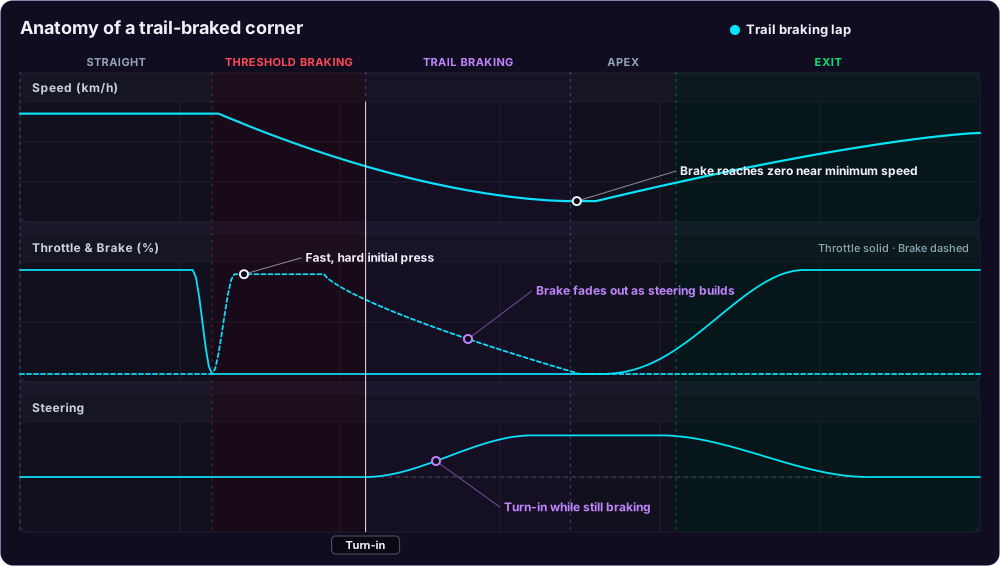
Trail braking means you keep some brake pressure while you turn into a corner and release it gradually, instead of finishing all your braking in a straight line first.
A braking zone then has two parts:
- Threshold braking. On the straight, you hit the brake hard, close to the limit of grip, and hold it.
- Trail braking. As you start steering, you trail off the brake: the pressure fades out step by step until it reaches zero somewhere around the apex.
The opposite is the classic beginner technique, often taught as "brake in a straight line, then turn". You brake, release the pedal completely, and only then start steering. It's safe and easy, but on almost every corner it's slower.
Why trail braking makes you faster
Grip is a budget
A tyre has a limited amount of grip. You can spend it on braking, on turning, or on a mix of both, but not on 100% of each at the same time. Engineers draw this as the friction circle.
In a straight line you spend almost all of it on braking. As you turn in, you need more and more for cornering, so you give back braking at the same rate. Trail braking is simply using the whole budget all the way to the apex. Braking first and turning later leaves part of it unused in between.
Weight on the front helps the car turn
When you brake, weight shifts to the front of the car. The front tyres are pressed harder into the road and grip more, so the car turns in more willingly. Keep a little brake on as you turn in and the front stays loaded. Release the brake completely before turning and the weight rocks back to the rear, the front gets light and the car tends to understeer.
Less time coasting
Between "brake off" and "throttle on", a car that doesn't trail brake is coasting: no brake, no throttle, just waiting for the car to turn. Those metres are wasted. Trail braking turns them into braking metres, which means you can brake later and carry more speed to the apex.
The car rotates for you
A car on the brakes with a loaded front axle rotates more easily. Used well, that rotation points the car at the exit earlier, so you can open the steering and get on the throttle sooner. That's where the real lap time is, because a better exit pays off all the way down the next straight.
How to trail brake, step by step
Pick one corner, ideally a slow or medium-speed corner after a straight. Then work through it in order:
- Brake hard and early in the pedal stroke. Go to your peak pressure quickly. A slow build-up wastes the part of the braking zone where the car can decelerate the hardest.
- Start releasing before you turn. As the car slows, the tyres can take less braking force. Begin easing off slightly before turn-in.
- Turn in while still on the brake. At turn-in you might still be at 30–60% of your peak pressure, depending on the car and corner.
- Bleed the pressure off smoothly. The more you steer, the less you brake. Think of the brake and the steering wheel as connected: one goes down as the other goes up.
- Reach zero near the apex. The brake should fade out as you reach minimum speed. Then there's a short moment of balance, ideally with a little throttle to settle the car.
- Unwind the steering and go to throttle. If the car has rotated well, you can open the wheel earlier and apply throttle sooner and more confidently.
The key word is smooth. It's not about how much brake you carry into the corner, it's about how gently the pressure leaves the pedal.
Too much brake too deep into a corner overloads the front tyres. In a car without ABS they lock and the car goes straight on; in a car with ABS it just won't turn. In rear-engined or very light cars, too much rotation can also turn into oversteer. Build up slowly.
Does it differ between cars?
The idea is the same everywhere; the amount and length of the trail change.
- Road cars and GT cars with ABS forgive a lot. ABS stops lock-ups, so you can trail brake deep, but too much pressure still costs grip for turning and makes the car push wide.
- Cars without ABS (many historic cars, formula cars, some prototypes) need a very precise release. Locking an inside front wheel is the most common mistake.
- High-downforce cars (formula cars, prototypes) brake extremely hard at high speed, but the downforce, and with it the grip, drops as they slow down. You have to release much more pressure as speed falls, so the brake trace looks steep at first and then flattens out.
- Slow, tight hairpins need only a short trail. Fast sweepers often need no braking at all, just a lift or a tap of the brake to load the front.
How to practise trail braking in sim racing
Get the hardware right first
- Calibrate your brake pedal in the sim and in your pedal software, so 100% on the pedal really is 100% in the game and a light touch registers as a light touch. A large dead zone makes a smooth release impossible.
- A load cell brake pedal helps a lot. It measures pressure, not travel, which is much closer to how your leg remembers force. It isn't required, though: plenty of fast drivers learn on a potentiometer pedal.
- Enable the pedal input overlay in your sim (most have one) so you can see the brake bar while driving.
Practice drills
- One corner, many laps. Choose a single corner after a long straight and drive 10–15 laps focusing only on that braking zone. Ignore the rest of the lap.
- Use a slow, forgiving car. A small road car or entry-level GT car on a familiar track gives you time to feel what the car does. Fast formula cars come later.
- Release in steps, then smooth them. First try two clear steps: full brake, then about half at turn-in, then zero at the apex. Once that works, blend the steps into one smooth fade.
- Brake a bit earlier on purpose. While learning, brake a few metres earlier than usual. That gives you room to carry brake into the corner without overshooting. Move the braking point later only when the release feels natural.
- Count the release. Some drivers count "one-two-three" from turn-in to apex while lifting off the pedal. It sounds silly but builds a consistent rhythm.
- Listen and feel. Force feedback gets lighter when the front tyres are overloaded, and in many sims you'll hear the tyres start to scrub. Both are signs to release a little more.
- Check every few laps in telemetry, as described below. Your feeling and the trace will often disagree at first.
Learn trail braking on a corner you already know well. You can't focus on your feet while you're still finding the braking marker.
How to analyse trail braking with telemetry
Telemetry is the best coach for trail braking because the whole technique is about timing between two inputs: the brake and the steering. In Flowix:
- Open a lap from Sessions or Leaderboards.
- Press Add Lap and choose a faster lap in the same car, ideally someone 0.5–1.5 seconds quicker. Your own best lap works too.
- Find a braking zone where the Time Delta line climbs, and drag across the charts to zoom into that corner.
- Look at three charts together: Speed, Throttle & Brake (the brake line is dashed) and Steering. Move the cursor across them; the hairline shows the same point on track in every chart.
Then ask four questions:
- Where does steering start, and how much brake is there at that moment? If the brake line is already at zero when the steering line starts moving, you're not trail braking.
- What shape is the release? It should be one smooth slope, not a cliff and not a staircase.
- Where does the brake reach zero? Close to the minimum speed is ideal. Far before it means coasting; far after it means you're dragging the brake past the apex.
- Is there a gap between brake and throttle? A long stretch where neither pedal is pressed is coasting.
New to reading telemetry? The beginner's guide to lap analysis explains all the charts first.
What good trail braking looks like on the charts
The picture below compares a trail-braked lap (cyan) with the same corner driven "brake, then turn" (orange). It's the most common difference you'll find when you compare your lap with a faster one.
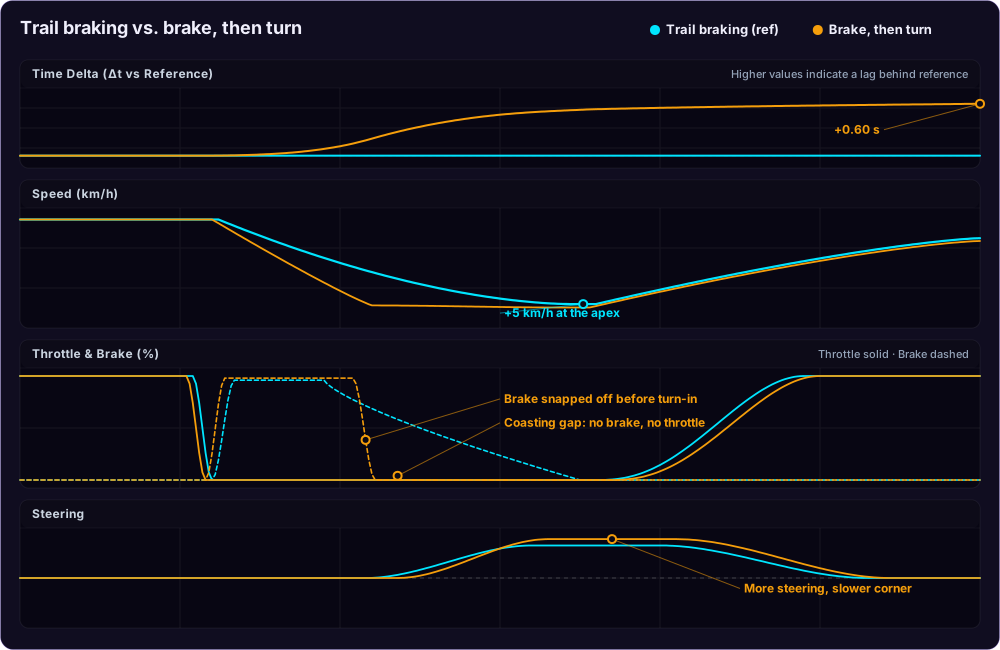
What to notice:
- Brake trace. The cyan brake line slopes down gradually while the steering builds. The orange line drops from full pressure to zero almost vertically, before the car even starts turning.
- Coasting gap. On the orange lap, both pedals sit at zero for a long stretch. That's the time spent waiting for the car to turn.
- Speed shape. With trail braking, the speed curve is a smooth V: it keeps falling right up to the apex and then rises. Without it, the curve is a U with a flat bottom: the driver slowed down too early and then rolled through the corner at minimum speed.
- Minimum speed. The trail-braked lap carries more speed through the apex, because it uses grip that the other lap left unused.
- Steering. The orange lap needs more steering for the same corner. The front is light and the car pushes wide, so the driver turns the wheel further.
- Time delta. The gap opens in the braking zone and keeps growing until the throttle comes back. One corner like this easily costs half a second.
Common brake trace shapes
When you look at your own laps, the brake line will usually look like one of these:
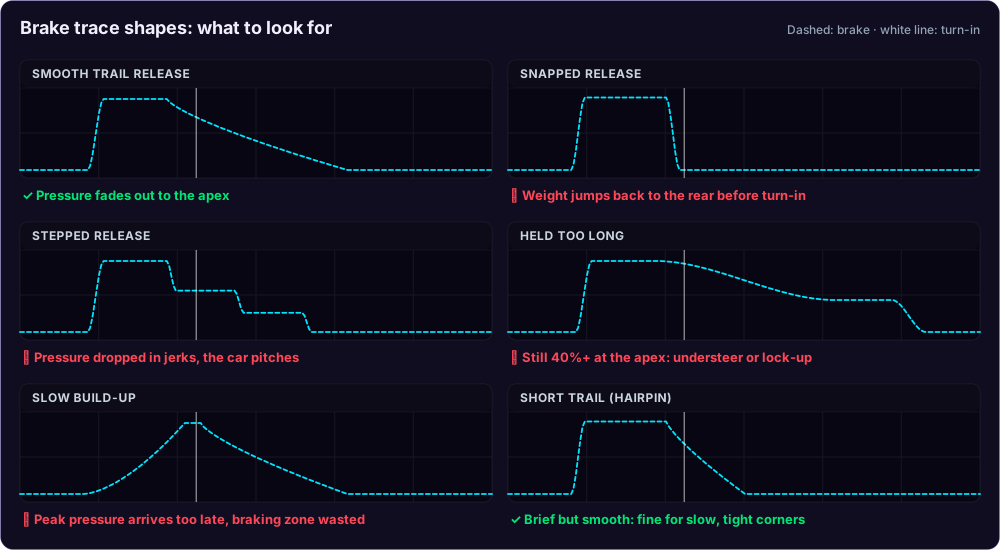
| Shape | What it means | What to try |
|---|---|---|
| Smooth trail release | Good technique | Keep it; try braking a little later |
| Snapped release | Brake off before turn-in, front goes light | Start releasing earlier and slower, keep some brake at turn-in |
| Stepped release | Jerky foot, the car pitches back and forth | Practise the two-step drill, then blend the steps |
| Held too long | Too much brake at the apex, understeer or lock-up | Release faster after turn-in, aim for zero at the apex |
| Slow build-up | Peak pressure reached too late | Hit the pedal harder in the first metre of the braking zone |
| Short trail (hairpin) | Normal for slow, tight corners | Fine as long as the release is smooth |
Some sims report brake pressure instead of pedal position, and with ABS active the car may brake less than the pedal suggests. Compare shapes and timing between laps rather than exact percentages.
Check the consistency too
Compare two or three of your own laps through the same corner. If the steering starts at the same point but your brake release looks different every time, the technique isn't automatic yet. Consistent shape first, then work on carrying a little more brake or braking later.
Brake bias can also show up here. If you always need to release very early because the car won't turn on the brakes, the bias may be too far forward; if the rear steps out every time you trail brake, it may be too far back. If your sim reports it, the Brake Bias chart in Flowix shows the setting lap by lap.
Ask the AI coach about your braking
Not sure what you're looking at? Connect an AI assistant to Flowix and ask it about one lap. It reads the brake and steering traces for you and explains what it sees, so you can check the charts while you read the answer.
Do I release the brake too early on my last lap?
Am I coasting anywhere on my best lap?
Explain why braking into the corner helps the car turn.
Is my brake bias OK for this car?
The brake bias question needs a sim that reports brake bias. Automobilista 2, Assetto Corsa EVO and RaceRoom do, so Flowix records it lap by lap. The original Assetto Corsa doesn't expose it, so there the AI coach can only judge balance indirectly, from your brake and steering traces.
Setup takes a few minutes with Claude, ChatGPT, Gemini or a local model in LM Studio.
Trail braking FAQ
Is trail braking always faster?
In most corners that need braking, yes. It isn't in very fast corners where you hardly brake, or when the car is already on the edge of oversteer. And badly done trail braking (too much brake, too late) is slower than clean braking in a straight line. Learn the clean version first, then add the trail.
Should I trail brake with ABS on?
Yes. ABS prevents lock-ups, but the tyres still have a grip budget. Releasing gradually keeps the front loaded and leaves grip for turning. Leaning on the ABS through the whole corner usually means understeer.
Why does my car spin when I trail brake?
Too much brake too deep into the corner, combined with a lot of steering, can unload the rear tyres until they let go. Release a bit sooner, use less steering at turn-in, or move the brake bias slightly forward.
Do I need a load cell pedal to trail brake?
No, but it makes learning easier. With a potentiometer or spring pedal, rely more on the pedal overlay and on your brake trace in telemetry to build the habit.
Quick checklist
- Calibrate your brake pedal and turn on the input overlay.
- Pick one corner after a straight, in a forgiving car.
- Brake hard, start releasing just before turn-in.
- Turn in with some brake still on, fade it to zero at the apex.
- Record 10–15 laps, then open the best one in Flowix next to a faster lap.
- Check the brake shape, the coasting gap and the minimum speed.
- Fix one thing, drive again, compare the time delta.